
ATS Resume Format
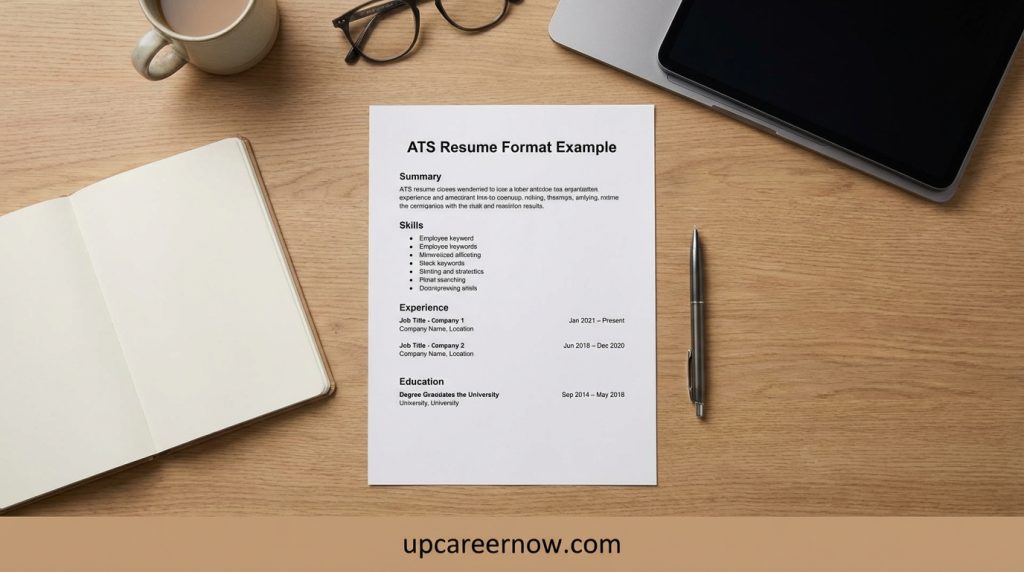
The best ATS resume format is a simple, text-first resume structure that stays readable after you upload it into job portals. When resumes lose spacing, merge job entries, or drop dates, it’s often because the format is too complex—not because the content is weak. A clean ATS-friendly layout helps screening systems capture your information correctly and helps recruiters scan faster.
In this guide, you’ll learn the safest ATS resume structure, formatting rules that prevent parsing errors, and quick examples you can copy for different career stages. You’ll also get a practical decision table to choose the right layout and a checklist you can run in two minutes before submitting applications.
If you need the full end-to-end system (summary + skills + bullets + tailoring workflow), use our main hub: resume writing guide at https://upcareernow.com/resume-writing-guide/.
What an ATS Resume Format Is (and Isn’t)
An applicant tracking system (ATS) is used by employers to collect applications and organize candidates. Many systems also convert your resume into a structured profile (for example: job titles, employers, dates, and skills). The goal of an ATS resume format is to make that conversion as accurate as possible—so your experience doesn’t get misread, merged, or dropped.
What an ATS resume format is
An ATS-friendly resume format is:
- Text-first: important information is typed text (not inside images or shapes).
- Predictable: standard headings and consistent job entry structure.
- Simple: one-column core content with clear spacing and bullet lists.
- Readable as plain text: if you copy/paste it into a text document, it still makes sense.
What an ATS resume format is not
A strong ATS resume format does not require you to:
- Remove all personality from your writing
- Avoid strong verbs and measurable outcomes
- Use robotic keyword lists
- Make the resume look ugly or unfinished
The best practice is balance: reliable parsing + fast human scanning.
Why “format” matters as much as content
Even a great resume can underperform if:
- dates shift into the wrong lines
- company names merge with job titles
- bullets become one long paragraph
- skills disappear or move out of place
That’s why this article focuses on structure and formatting first. For content strategy (summary, bullets, and tailoring workflow), see: Resume Writing Guide (ATS-Friendly + Human-Friendly) at https://upcareernow.com/resume-writing-guide/.
Best ATS Resume Format Structure
If you want the safest default, use a one-column layout with standard headings and a consistent job-entry pattern. This best ATS resume format works because most ATS tools can reliably detect the start and end of each section when the structure is predictable.
The safest ATS resume structure (recommended order)
- Header
Name, location (city/country), phone, email, and (optional) a simple portfolio URL. - Headline + Summary (2–4 lines)
A quick role-fit snapshot. Keep it text-only and readable. - Skills (grouped and prioritized)
Put the most relevant skills first. Avoid long inventories. - Experience (proof-first bullets)
Each role should follow the same pattern: title/company/dates/location, then bullets. - Education
Degree, school, graduation year (or expected year). Keep it consistent. - Optional sections (only if they strengthen your match)
Certifications, Projects, Volunteer, Languages.
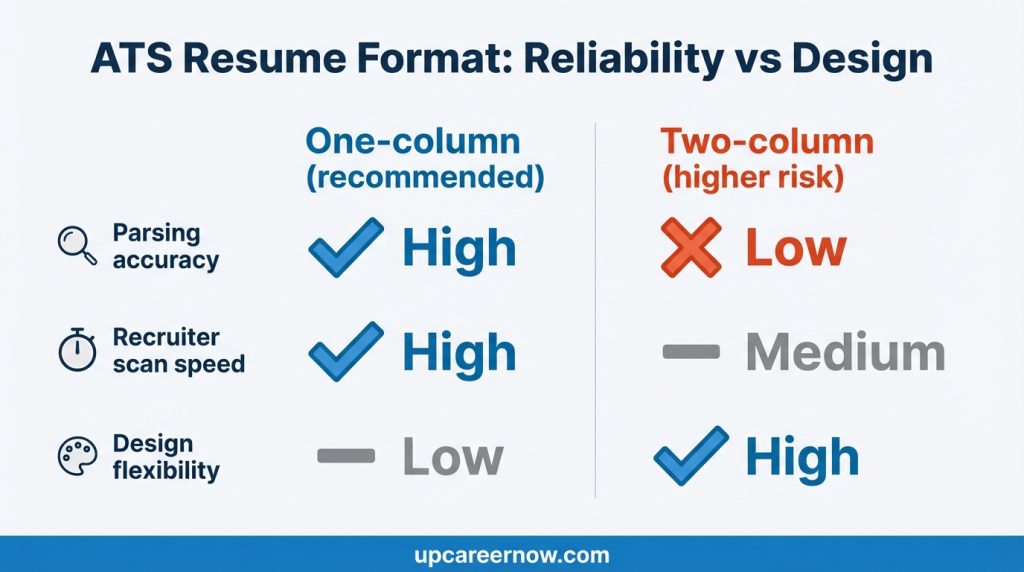
Why one column beats two columns for ATS
Two-column designs can look modern, but many systems convert columns into a confusing reading order. That can cause:
- dates appearing under the wrong job
- skills merging into the experience text
- job titles turning into scattered fragments
If you want maximum reliability, a one-column ATS resume format is the safest choice.
A clean job entry template (copy-ready)
Use the same structure for every role:
Job Title — Company | City, Country | Dates
One-line context (optional): team scope, purpose, or scale.
- Proof bullet (outcome + method + scope)
- Proof bullet
- Proof bullet
This helps parsers and people find what they need quickly.
If you need help writing stronger summaries and proof bullets that fit this structure visit:
Resume Writing Guide (ATS-Friendly + Human-Friendly)
ATS Resume Format Examples (By Career Stage)
Below are ATS resume format examples that keep parsing reliable while still highlighting what matters most at each stage. Think of these as “structure examples” you can adapt without over-designing.
Example A: Entry-level / Fresh graduate (limited experience)
Best format focus: skills + projects + education clarity
Recommended order
- Header
- Summary (short and specific)
- Skills (core + tools)
- Projects (2–3 projects with bullets)
- Experience (internships/part-time, if any)
- Education
Why this works: if you don’t have long work history, ATS still needs clear sections and dates, and recruiters need proof. Projects provide that proof when structured like experience.
Mini template
Project Name | Tool(s) | Date/Duration
- Built/created/improved ___ resulting in ___
- Used ___ to ___
- Delivered ___ for ___ (scope)
(Your separate support article “Fresh graduate resume (no experience) template guide” can expand this later.)
Example B: Mid-career (experience is your main proof)
Best format focus: outcomes, scope, progression
Recommended order
- Header
- Summary
- Skills (prioritized)
- Experience (most detail here)
- Education
- Certifications (if role-relevant)
Why this works: recruiters scan the top third to confirm role fit, then jump into your most recent experience for proof.
Mini template
Job Title — Company | Location | Dates
One-line context (optional): ownership area + scale.
- Reduced / improved / delivered ___ by ___ (scope)
- Led / built / implemented ___ using ___
- Coordinated ___ with ___ to achieve ___
Example C: Career changer (new target role, transferable proof)
Best format focus: repositioning + evidence mapping
Recommended order
- Header
- Summary (states target direction clearly)
- Skills (include target-role skills you truly have)
- Relevant Projects (or Relevant Experience subsection)
- Experience (with bullets translated into the new role language)
- Education / Certifications
Why this works: career changers need a format that makes the “why you fit” story obvious without hiding reality.
Mini template
Relevant Project / Relevant Experience
- Demonstrated ___ (target skill) by ___
- Used ___ (tool/process) to produce ___
- Result: ___ (scope/outcome)
Quick reminder
These examples are about structure. Your wording still matters, but structure is what prevents ATS confusion and makes humans scan faster.
Formatting Rules That Prevent Parsing Errors
Most ATS problems come from reading order and text conversion issues. This section gives you the safest “do/avoid” rules for an ATS-friendly resume format.
Use these ATS-safe formatting rules
- One-column layout for core content
- Standard headings (Summary, Skills, Experience, Education)
- Plain text section titles (no shapes or text boxes)
- Bullets as real text (• or -), not icons
- Consistent spacing (avoid extreme gaps)
- Consistent date format across all roles
- Left-aligned text for most content (easiest to scan)
Avoid these common parsing triggers
- Columns where experience is split across left/right
- Tables used to layout job history (ATS may read cells out of order)
- Graphics that contain key text (text may not be extracted)
- Skill bars (they look nice but often lose meaning in parsing)
- Headers/footers filled with important text (some systems ignore them)
- Unusual bullet symbols that turn into blank squares
Font, sizing, and spacing (safe defaults)
You don’t need anything fancy. Keep it readable:
- Simple, standard fonts
- Consistent heading style (bold is enough)
- Bullet spacing that keeps each point 1–2 lines when possible
The “plain text test” rule
If your resume still looks logical when:
- copied and pasted into a plain text document, and
- read top-to-bottom without confusion,
then your formatting is usually ATS-safe.
Headings, Dates, and Job Entry Layout
A strong ATS resume format is consistent. ATS tools are better at identifying patterns than interpreting creative layouts. Your job is to make each section and each role entry easy to detect.
Use standard headings (and keep them simple)
Use these exact-style headings (or close equivalents):
- Summary
- Skills
- Experience (or Professional Experience)
- Education
Optional: Certifications, Projects, Volunteer Experience
Avoid headings that hide meaning, like “My Journey” or “What I’ve Done,” because parsing and quick scanning become harder.
Dates: pick one format and stick to it
Choose one of these and use it everywhere:
- 2022 – 2025 (clean and compact)
- Jan 2022 – Feb 2025 (adds clarity if needed)
Tip: If you include months for one role, include months for all roles (consistency matters).
The cleanest job entry layout (ATS-friendly)
Use a predictable, repeatable line:
Job Title — Company | Location | Dates
Then (optional) a one-line context statement:
- “Supported ___ team handling ___ (scope).”
Then bullets:
- Outcome-first bullet
- Outcome-first bullet
- Outcome-first bullet
Avoid “floating” elements
Parsing breaks when content is separated from its label. Keep:
- dates on the same line as the job title/company, or directly next line
- location close to the role (not in a distant margin)
- bullets directly under the correct job
Consistency beats creativity
In ATS-heavy hiring, the best ATS resume format is the one that keeps all roles uniform. Even small differences (like switching date styles) can cause the system to misread entries.
Skills Section Placement (ATS-Friendly)
A skills section helps both ATS search and recruiter scanning—but only if it’s structured and believable. This ATS-friendly resume format approach keeps skills easy to parse and easy to validate.
Best placement for most resumes
Put Skills in the top third:
- Header
- Summary
- Skills
- Experience
This works because many reviewers confirm role fit through skills before reading your full work history.
How to structure skills for ATS
Use grouped lists (simple text), for example:
- Core Skills: process improvement, reporting, stakeholder coordination, quality assurance
- Tools: (only what you used)
- Methods/Knowledge: documentation, workflow design, training support
This is clearer than one huge list, and it stays readable in plain text.
How many skills to include
Keep it focused:
- 6–10 core skills
- 6–12 tools (only if tools matter for the role)
- 4–8 methods/knowledge items
Long skill inventories can look like keyword dumping. A strong ATS resume format favors relevance and proof.
“Proof alignment” rule
If you list a key skill, support it somewhere:
- in an experience bullet, or
- in a project bullet
This prevents the resume from feeling inflated and helps interviews go smoother.
Bullets That Stay Readable in ATS
Bullets can look great in a designed document but fall apart after upload if they’re too dense or formatted inconsistently. This section keeps your bullets readable in any ATS resume format.
The safest bullet formatting
- Use standard bullet characters: • or –
- Keep each bullet 1–2 lines when possible
- Use the same bullet style throughout the resume
- Avoid multi-level bullet nesting (it can flatten poorly)
Proof-first bullet structure (ATS-safe)
Start with the result, then explain how:
Outcome + action + method + scope
Examples you can adapt:
- Reduced turnaround time by improving intake steps and standardizing templates across two teams.
- Improved accuracy by adding validation checks and updating documentation used during onboarding.
- Supported cross-team delivery by tracking risks weekly and aligning stakeholders on priorities.
If you don’t have metrics
Use clear scope signals:
- “weekly reporting,” “high-volume requests,” “cross-functional coordination,” “reduced rework,” “fewer escalations”
This still communicates impact without inventing numbers.
Common bullet issues that reduce clarity
Avoid:
- Task-only bullets (“Responsible for…”)
- Paragraph bullets (hard to scan)
- Buzzwords without evidence
- Too many acronyms without context
Keep verbs specific
Strong ATS-friendly verbs are still simple:
- improved, reduced, built, supported, delivered, coordinated, implemented, streamlined, documented, trained
A reliable ATS resume format is not about sounding fancy—it’s about being understood quickly.
Quick 2-Minute ATS Upload Test
This is the fastest way to catch ATS format problems before they cost you time. A good ATS resume format should pass both tests below.
Test A: Plain-text copy/paste (60 seconds)
- Open your resume PDF (or DOCX).
- Copy all text.
- Paste into a plain text document.
Check for:
- Headings still appear in the right order
- Job titles/company names aren’t merged into one line
- Dates remain attached to the correct role
- Bullets remain as separate bullet lines (not one paragraph)
If anything looks scrambled, simplify formatting: remove columns, reduce spacing tricks, avoid tables for layout, and keep headings plain.
Test B: Portal preview scan (60 seconds)
Upload to any application portal (or a test site) and look at the preview or parsed profile, if available.
Check for:
- Correct job titles, employers, and dates
- Proper section separation
- Skills appearing as intended
- No missing parts from headers/footers
Quick fix rules if the preview is wrong
- Convert to one column
- Remove tables used for layout
- Move important text out of headers/footers
- Replace unusual symbols with standard bullets
- Keep headings and job entries consistent
This test doesn’t guarantee how every employer system behaves, but it catches the most common failures in an ATS-friendly resume format.
Decision Inputs & Outcomes
| Decision input | Recommended choice | Why it helps | Best for | Risk to watch |
|---|---|---|---|---|
| Layout | One-column | Most reliable parsing + predictable reading order | Job portals and high-volume screening | Looks plain if your bullets lack proof |
| Headings | Standard section headings | Makes sections easier to detect and index | All roles | Creative headings may be misread or skipped |
| Dates | One consistent date style | Prevents merged or misplaced job entries | All roles, especially multi-job histories | Mixing month/year styles can confuse parsing |
| Skills display | Grouped text lists | Readable as plain text and searchable | Skill-driven roles | Long lists can look like keyword dumping |
| Design elements | Minimal graphics | Reduces risk of missing text during conversion | ATS-heavy processes | Text in shapes/images may not extract |
| Bullets | Short, outcome-first bullets | Improves scan speed and credibility | Most roles and levels | Paragraph bullets reduce clarity |
ATS Resume Format Checklist Table
| Area | Do this | Avoid this | Quick self-test |
|---|---|---|---|
| Core layout | One-column resume | Two columns for main text | Plain-text view reads top-to-bottom? |
| Headings | Summary, Skills, Experience, Education | Creative headings that hide meaning | Can you find each section in 5 seconds? |
| Job entries | Title — Company | Location | Dates | Dates floating in margins | Do titles/dates stay attached after upload? |
| Bullets | Outcome-first, 1–2 lines | Paragraph bullets | Does each bullet answer “so what”? |
| Tables | Use for optional small lists only (if needed) | Tables for experience layout | Does the ATS preview merge rows incorrectly? |
| Graphics | Keep minimal | Text in images or shapes | Is key text selectable in the PDF? |
| Consistency | One date style and one bullet style | Mixed styles across roles | Do entries look uniform down the page? |
Author: UpCareerNow Editorial & Research Team
Role: Editorial team specializing in resume strategy, ATS-safe formatting, and hiring-aligned career guidance.
Bio: The UpCareerNow Editorial & Research Team publishes practical, AdSense-safe career resources designed to help readers present their experience clearly and accurately. This article focuses on reliable ATS resume format choices that reduce parsing errors, improve scan speed, and keep resumes easy to verify in real hiring workflows.
FAQs
1) What is the best ATS resume format for most applicants?
The safest ATS resume format is a one-column layout with standard headings (Summary, Skills, Experience, Education) and simple bullets. It reduces the chance of scrambled sections after upload.
2) Do columns break ATS resume format parsing?
Columns can confuse reading order during conversion, which may cause dates, titles, and bullets to merge. For maximum reliability, keep your ATS resume format one-column for core content.
3) Can I use tables in an ATS-friendly resume format?
Tables used for layout (especially experience) can convert unpredictably. If you use tables at all, keep them away from core job history and ensure the plain-text view still reads correctly.
4) How should I format dates so an ATS reads them correctly?
Pick one style (e.g., 2022–2025 or Jan 2022 – Feb 2025) and use it everywhere. Consistent dates help the ATS correctly separate roles and timelines.
5) Where should the skills section go in an ATS resume format?
Usually in the top third, after the summary. It helps both ATS keyword matching and recruiter scanning—then your experience bullets provide proof.
6) What’s the fastest way to test if my ATS resume format is working?
Run the plain-text copy/paste test and check an application portal preview. If headings, job entries, and bullets look clean, your format is likely safe.
7) Should I submit PDF or DOCX?
Follow the employer’s instructions. If they allow either, a text-based PDF often preserves layout well—just ensure the text is selectable and passes the plain-text test.
Limitations and Disclaimer
“Career information on UpCareerNow is provided for general guidance and planning purposes only. Actual outcomes depend on skills, experience, location, and market conditions.”
Ad & Content Safety Note
This article is written to be practical and AdSense-safe. It avoids guarantees and exaggerated claims. ATS behavior can vary by employer system and configuration, so use these formatting rules as a reliability baseline and follow each application’s submission instructions.
REFERENCES
- U.S. Department of Labor — CareerOneStop (Resume Guide): Applicant Tracking Systems (ATS).
https://www.careeronestop.org/JobSearch/Resumes/ResumeGuide/TopResumeStrategies/applicant-tracking-systems.aspx - National Association of Colleges and Employers (NACE) — What employers look for when reviewing resumes.
https://www.naceweb.org/talent-acquisition/candidate-selection/what-are-employers-looking-for-when-reviewing-college-students-resumes
Work Experience Section: Bullet Formulas That Work
Resume Writing Guide (ATS-Friendly + Human-Friendly)

Behavioral interview: STAR method with examples
About The Author
