
Resume Keywords: How to Match Job Descriptions Safely

Resume keywords are the role-specific terms employers use to describe skills, tools, responsibilities, and outcomes. When your resume uses the same language—accurately and naturally—it becomes easier for screening systems and recruiters to recognize that you match the job. The goal is not to “game” anything. The goal is clarity: making your experience searchable, scannable, and defensible.
In this guide, you’ll learn how to extract keywords from a job description, choose the right number of terms, and place them in the highest-impact sections (summary, skills, and proof bullets) without stuffing. You’ll also get a quick decision table and checklist you can run for every application.
For the full resume system (format + summary + bullets + tailoring workflow), start with our hub: Resume Writing Guide (ATS-Friendly + Human-Friendly).
What Resume Keywords Are (and Why They Work)
Resume keywords are the job-relevant words and phrases that signal what you can do. They usually fall into a few predictable buckets:
1) Role identity keywords
These are titles and role families:
- “operations coordinator,” “data analyst,” “customer support specialist,” “project coordinator”
They help a reader confirm your fit quickly.
2) Responsibility keywords
These describe what the job involves:
- reporting, scheduling, troubleshooting, documentation, stakeholder coordination, inventory tracking
3) Tool and system keywords
These are the platforms or systems used in the role (only list what you truly used):
- CRM, ticketing system, spreadsheet reporting, scheduling tools
4) Method keywords
These describe how work is done:
- process improvement, quality checks, escalation handling, onboarding support
5) Outcome keywords
These show business impact:
- reduced turnaround time, improved accuracy, fewer escalations, better consistency, on-time delivery
Why keywords help (the practical reason)
A good keyword match does two things:
- It helps your resume appear relevant in searches and filters.
- It helps people scan faster because your resume “sounds like the role.”
In other words, keyword matching is often a clarity tool, not a trick.
The rule that keeps keywords safe
In this guide, every keyword must be defensible. If you cannot explain a keyword with a real example, don’t include it. A resume that is honest and clear performs better long-term than a resume that looks optimized but can’t be backed up.
For a full end-to-end system (format + summary + bullets), read full Resume writing guide.
How to Extract Resume Keywords From a Job Description
The safest way to pick resume keywords is to extract them directly from the job description, then keep only the terms you can prove. This avoids random guessing and prevents keyword stuffing.
Step 1: Copy the job description into a note (clean text)
You don’t need the whole page—just:
- responsibilities
- requirements
- “preferred” skills
- tools/systems
- outcomes (what success looks like)
Step 2: Highlight keywords in five buckets
Use the buckets below so you capture the right mix:
- Role identity (title + close variations)
- Core responsibilities (5–10 items)
- Tools/systems (only if relevant to your background)
- Methods (processes, workflows, standards)
- Outcomes (speed, quality, customer impact, delivery)
Step 3: Build a “shortlist” (8–14 core terms)
Most roles don’t need 50 keywords. Pick the terms that:
- appear multiple times in the posting, and/or
- are listed as required, and/or
- represent the main daily work
Step 4: Filter with the proof test
For each keyword, ask:
- Can I back this with a bullet or example?
- Did I actually do this work (not just observe it)?
- Would I say this confidently in an interview?
If the answer is “no,” remove it—even if it’s in the posting. Your resume should match the role truthfully, not aggressively.
Quick example (how to shortlist)
If a posting repeats “reporting,” “stakeholder coordination,” “documentation,” and “process improvement,” those are probably better core resume keywords than rare terms that appear once.
How Many Resume Keywords to Use (Safe Ranges)
A safe keyword strategy is about coverage, not repetition. In this article, we use resume keywords to improve clarity and match signals while keeping the resume natural.
Safe ranges (for most roles)
Use these as guidelines, not strict rules:
- 8–14 core resume keywords (the main role terms)
- 4–8 secondary keywords (supporting skills/tools/methods)
- 1–3 outcome keywords (impact language like “reduced turnaround time”)
Why “more keywords” can backfire
Too many keywords can create problems:
- the resume becomes a list rather than evidence
- the top third looks like stuffing
- interviews become harder because claims aren’t supported
- recruiters may question credibility if the resume reads like a copied posting
What “good coverage” looks like
A strong keyword strategy usually means:
- summary includes 1–2 core keywords
- skills includes 6–12 relevant terms (grouped)
- experience includes 6–10 role terms naturally across bullets
- keywords appear where they make sense (not everywhere)
Practical rule: no forced repetition
If a keyword shows up multiple times, it should be because:
- you used that skill/tool repeatedly, and
- it’s relevant to the role, and
- it fits naturally in bullets
A clean approach keeps your resume human-readable while still aligned.
Where to Put Resume Keywords (High-Impact Placement)
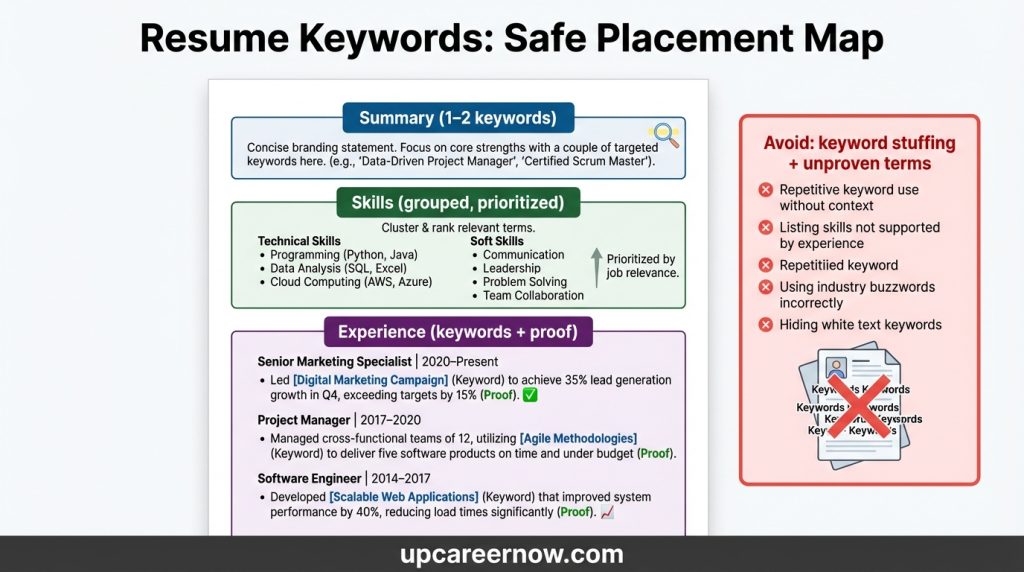
Not all placements are equal. The best resume keywords live in sections recruiters and systems rely on most: the top third and the experience proof.
1) Summary (high impact, low volume)
Use 1–2 core keywords that define your role direction.
- Example: “operations coordination,” “reporting,” “customer support,” “process improvement”
Goal: signal role fit quickly without sounding stuffed.
2) Skills (structured, searchable)
Skills is the natural home for many resume keywords, especially tools and methods.
Use grouped lists (simple text), such as:
- Core Skills: (6–10)
- Tools: (only what you used)
- Methods/Knowledge: (4–8)
Goal: help scanning and searching without turning it into an inventory dump.
3) Experience bullets (the most important placement)
Your experience section is where keywords become believable.
Place keywords in bullets only when:
- the bullet explains what you did, and
- the keyword naturally labels that work
Goal: keywords + proof in the same place.
4) Projects (for beginners and career changers)
If you lack direct experience, use projects to support resume keywords:
- tools used
- outputs delivered
- measurable outcomes or scope
Goal: fill evidence gaps without exaggeration.
Avoid low-value keyword placement
Avoid forcing keywords into:
- the header
- random “interests” sections
- repeated “keyword lists” that don’t add proof
Keyword Matching Without Stuffing
Keyword stuffing happens when a resume repeats terms without adding meaning. It can make your resume look copied, reduce readability, and create credibility problems in interviews. The goal is resume keywords that fit naturally and are supported by evidence.
What stuffing looks like (common patterns)
- A skills section with 40–80 terms, many unrelated
- Repeating the same keyword in every bullet
- Copying a job posting sentence into your experience
- Listing tools you’ve never used
- Adding buzzwords without context (“synergy,” “results-driven,” “dynamic”)
The safe alternative: “keyword + proof”
Use keywords where the proof already exists:
- Put the keyword in the bullet only if the bullet describes that work
- Put the tool name only if you used it
- Put outcome language only if you can explain how it was achieved
Use keyword variations sparingly
Many roles use synonyms:
- “stakeholder management” vs “cross-team coordination”
- “documentation” vs “SOPs”
- “reporting” vs “dashboards”
Choose the most common wording from the job posting as your primary label, then use 1–2 variations only when it improves clarity.
Quick self-check (10 seconds)
If your resume reads naturally out loud, it’s usually not stuffed. If it sounds like a copied posting, it probably is.
Skills vs Experience: The Proof Rule
A resume that ranks for keywords but lacks proof often fails with recruiters. This is why this guide uses the proof rule for resume keywords:
The proof rule (simple)
If a keyword appears in your Skills section, it should be supported by:
- an experience bullet, or
- a project bullet
This keeps your resume credible and interview-ready.
How to apply it (fast method)
- Circle your top 8–14 keywords.
- Check your Experience section and mark where each keyword is supported.
- If a keyword has no proof:
- add proof by rewriting a bullet (if true), or
- remove the keyword
Skills: what belongs here
Skills is best for:
- named tools you used
- consistent responsibilities you’ve performed
- methods you understand and applied
Skills is not ideal for:
- vague traits (“hardworking”)
- overly broad terms with no examples
- rare niche keywords you can’t explain
Experience: where keywords become believable
Experience bullets should show:
- what you did (action)
- why it mattered (result)
- how you did it (method/tools)
- scope (volume, frequency, stakeholders)
This is where resume keywords actually help you: they label proof in a way recruiters recognize.
Keywords for Career Changers (Transferable Mapping)
Career changers often struggle with keywords because the job posting uses a new “language.” The solution is not stuffing new terms—it’s mapping your real work to the target role terms.
Step 1: Identify “equivalent work” keywords
Many responsibilities are the same across industries but labeled differently:
- “stakeholder coordination” may describe working with internal teams, vendors, or clients
- “documentation” may include SOPs, checklists, training notes, or knowledge-base articles
- “reporting” may include weekly updates, tracking sheets, dashboards, or performance summaries
Step 2: Use keywords that match your proof
Choose target keywords only when you can support them with:
- a bullet that describes the work, or
- a project that demonstrates the skill/tool
Step 3: Add a “Relevant Projects” bridge (if needed)
If you lack direct experience, create 2–3 projects that:
- use the target tools/processes (truthfully)
- produce a clear output (report, workflow, analysis, documentation)
- show scope or outcome (even small-scale)
Step 4: Keep your story consistent
In a career change, your top third should align:
- summary states the target direction
- skills lists only what you have or are actively building
- experience bullets use transferable proof language
Quick 10-Minute Keyword Tailoring Workflow
This is a repeatable workflow to tailor resume keywords from a job description without rewriting your whole resume. It’s fast, realistic, and defensible.
Minute 1–2: Extract the core terms
From the posting, highlight:
- the role title(s)
- 8–14 core responsibilities/skills
- tools/systems mentioned
- “must-have” requirements
Minute 3–5: Update the top third (small changes, big impact)
- Add 1–2 core keywords to your summary (only if true)
- Reorder your skills so the most relevant appear first
- Remove 2–4 skills that don’t match the role (reduce noise)
Minute 6–9: Align 2–4 bullets (proof-focused)
Pick 2–4 bullets and tighten them so they naturally include a target keyword:
- keep the work accurate
- add scope signals (volume, frequency, stakeholders)
- mention tools only if you used them
Minute 10: Run the proof rule
Scan your skills list and confirm your top keywords have matching proof in experience/projects.
Result: your resume reflects the role language without becoming a keyword list.
Decision Inputs & Outcomes
| Decision input | If you choose this | Likely outcome | Best for | Risk to watch |
|---|---|---|---|---|
| Keyword volume | 8–14 core keywords + a few secondary terms | Clear match signals without noise | Most roles | Too few keywords can hide fit |
| Keyword placement | Summary + grouped Skills + proof bullets | Readable, defensible alignment | ATS + recruiter review | Stuffing keywords into every section |
| Tools keywords | Only tools you truly used | Higher credibility in interviews | Tool-driven roles | Listing tools you can’t demonstrate |
| Synonyms | Primary posting term + limited variations | Natural writing + better clarity | Roles with mixed terminology | Using too many variations becomes messy |
| Career change approach | Transferable mapping + relevant projects | Clear story + evidence bridge | Career changers | Using target keywords without proof |
| Tailoring method | Edit top third + align 2–4 bullets | Fast, repeatable improvement | High-volume applying | Over-editing creates inconsistencies |
Resume Keywords Checklist Table
| Area | Do this | Avoid this | Quick self-test |
|---|---|---|---|
| Keyword selection | Extract terms from the job description | Guessing random keywords | Do the terms reflect real posting language? |
| Keyword count | Focus on 8–14 core terms | Massive keyword inventories | Can a recruiter skim skills in 10 seconds? |
| Placement | Summary + grouped Skills + proof bullets | Keyword lists with no proof | Do keywords appear where work is described? |
| Proof rule | Support top keywords in experience/projects | Unproven keywords | Can you explain each keyword with an example? |
| Tools | List only tools you used | Tools you can’t demonstrate | Could you answer “how did you use it?” |
| Tailoring | Update top third + tune 2–4 bullets | Rewriting everything | Is your resume consistent end-to-end? |
Author Bio
Author: UpCareerNow Editorial & Research Team
Role: Editorial team specializing in resume strategy, ATS-safe writing, and hiring-aligned career guidance.
Bio: The UpCareerNow Editorial & Research Team creates practical career resources that help readers present experience clearly and accurately. This article explains how to use resume keywords as a clarity tool—matching job descriptions safely, avoiding stuffing, and keeping every keyword defensible with real proof.
FAQs
1) What are resume keywords?
Resume keywords are job-relevant terms (skills, tools, responsibilities, and outcomes) that help recruiters and screening systems recognize your fit for a role.
2) How many resume keywords should I use?
For most roles, start with 8–14 core resume keywords pulled from the job description, plus a few secondary terms. Focus on coverage and proof, not repetition.
3) Where should I put resume keywords in my resume?
The highest-impact placements are the summary (1–2 terms), a grouped skills section, and experience bullets where the keyword is supported by proof.
4) What is keyword stuffing and why should I avoid it?
Stuffing is repeating keywords without adding meaning or evidence. It can reduce readability and create credibility problems in interviews if you can’t support the claims.
5) Can I include keywords for tools I’m learning but haven’t used at work?
Be careful. If you include a tool keyword, you should be able to explain how you used it in a project or real setting. If you can’t, it’s safer to leave it out.
6) How do I use resume keywords if I’m changing careers?
Map transferable proof to target-role language and add 2–3 relevant projects if needed. Use keywords only when you can support them with real examples.
7) What’s the fastest way to tailor keywords for each application?
Update the top third (summary + skills order) and align 2–4 bullets with the job’s core terms—then run the proof rule to keep everything defensible.
Limitations and Disclaimer
“Career information on UpCareerNow is provided for general guidance and planning purposes only. Actual outcomes depend on skills, experience, location, and market conditions.”
Ad & Content Safety Note
This article is written to be practical and AdSense-safe. It avoids guarantees, exaggerated outcomes, and advice that encourages misrepresentation. Use keyword alignment as a clarity tool, and keep every keyword truthful and defensible.
REFERENCES
- U.S. Department of Labor — CareerOneStop (Resume Guide): Applicant Tracking Systems (ATS).
https://www.careeronestop.org/JobSearch/Resumes/ResumeGuide/TopResumeStrategies/applicant-tracking-systems.aspx - National Association of Colleges and Employers (NACE) — What employers look for when reviewing resumes.
https://www.naceweb.org/talent-acquisition/candidate-selection/what-are-employers-looking-for-when-reviewing-college-students-resumes

Interview Preparation Guide (Questions, Answers, Strategy)
Behavioral interview: STAR method with examples
Strengths and Weaknesses Interview Answer (Safe Examples)
About The Author
